Webflow SEO: 4 Best Practices To Rank Higher
Key takeaways
- Webflow is a powerful platform for SEO, offering features like clean HTML, built-in SEO tools, responsive design, and easy content management.
- Properly use header tags (H1, H2, H3) to organize content and improve search engine understanding.
- Craft engaging and keyword-rich SEO titles and meta descriptions for every page to attract clicks.
- Prioritize page loading speed by optimizing images, videos, and code to prevent lower search rankings.
Webflow is rising in popularity in the website development and design space, letting you build and launch websites with intuitive design capabilities using “no code.”
The platform’s SEO capabilities revolutionize the SaaS and Fintech industries into powerful user-generation machines. However, many companies are still unsure whether Webflow can support their growth and whether its SEO capabilities are on par with other CMS platforms like WordPress.
In this article, we will address this question and present the top Webflow SEO techniques for enhancing your site’s visibility and search engine rankings. Let’s get started!
Is Webflow good for SEO?
In short, yes, Webflow is great for SEO.
The platform offers robust features that let users optimize websites for search engines and improve their SEO strategy. Some key advantages of using Webflow for SEO include the following:
- Generate clean HTML code: Search engines prefer websites with organized and well-structured code, which helps them understand the page’s content and context. Webflow ensures that your website will have a solid foundation regarding the quality of the code.
- Use built-in SEO tools and settings: Tools like meta tags, XML sitemaps, and automatic generation of image alt texts are entirely customizable. These features ensure that search engines can crawl and index your website easily, improving visibility in the search engines.
- Create a responsive and mobile-friendly website: Webflow’s responsive design capabilities ensure that your website looks and performs well on devices of all shapes and sizes.
- Integrate with third-party tools: From social media sharing buttons to Google Analytics, Webflow lets you easily integrate these elements into your site, improving its functionality and user experience.
- Easily manage and create your content: With just a few clicks, you can add images, headings, paragraphs, and more to your pages to structure visually appealing content optimized for search engines.
Leveraging Webflow’s SEO capabilities requires technical knowledge and content optimization skills. So, let’s go through them.
4 Webflow SEO best practices to rank your site higher
Here are our tips to begin your Webflow SEO:
1. Improve navigation by setting up a proper URL structure
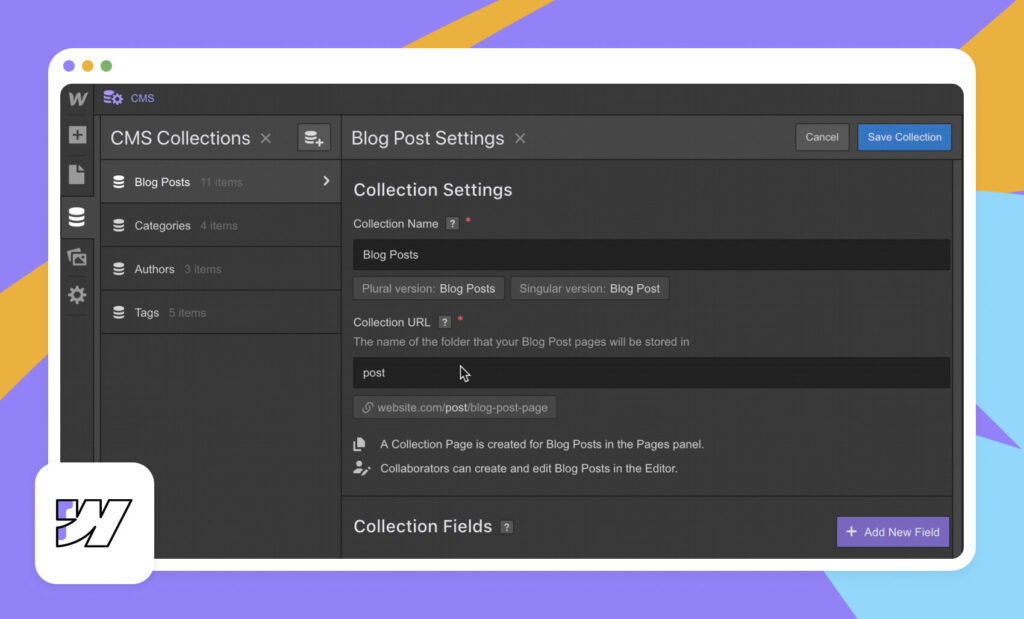
A seamless and intuitive website navigation is crucial for both SEO and user experience. Webflow lets you customize your site navigation to match your specific requirements. Ensure a clear, organized, and easy-to-navigate menu.
This is where a proper URL structure can help. A well-structured URL improves user experience and contributes to better search engine results.
When using Webflow to design your website, aim to create:
- Clean URLs
- Descriptive URLs
- Concise URLs that reflect the page’s content
This practice will help search engines understand your website’s architecture and improve user navigability. Avoid using irrelevant and lengthy URLs; use a hierarchical structure to organize your site’s pages logically.
2. Use proper header tags
Header tags, such as H1, H2, and H3, play a big role in organizing your content and giving search engines a hierarchical structure. They show you pages and the main topics and subtopics of content. Besides helping search engines and readers understand your pages, they will show how every part of the content is correlated to one another.
When optimizing your site’s content, ensure your header tags are used appropriately. A common SEO bad practice is websites using more than one H1 tag per page.
Here are tips for implementing H tags for your content:
- Only use one H1 tag per page for the page title.
- Outline your primary subtopic sections with H2 tags.
- Include H3 tags to increase the scope of your subtopic and add additional points to it.
- Include keyword variations naturally within the subtopics (avoid forcing it).
Using headers correctly will help search engines understand the relevance and importance of your content’s sections.
3. Add SEO titles and meta descriptions on every page
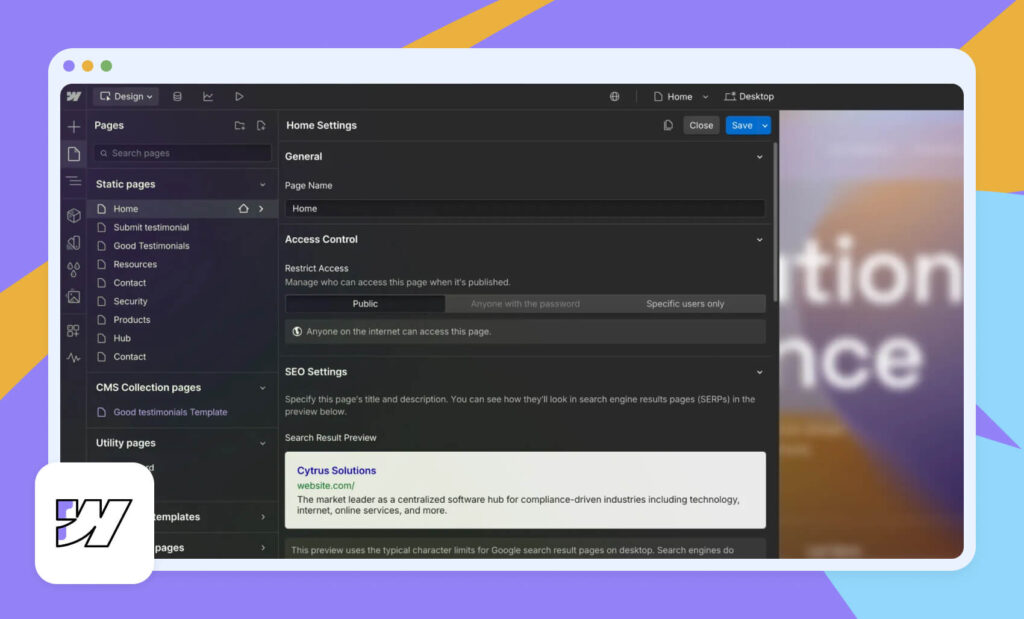
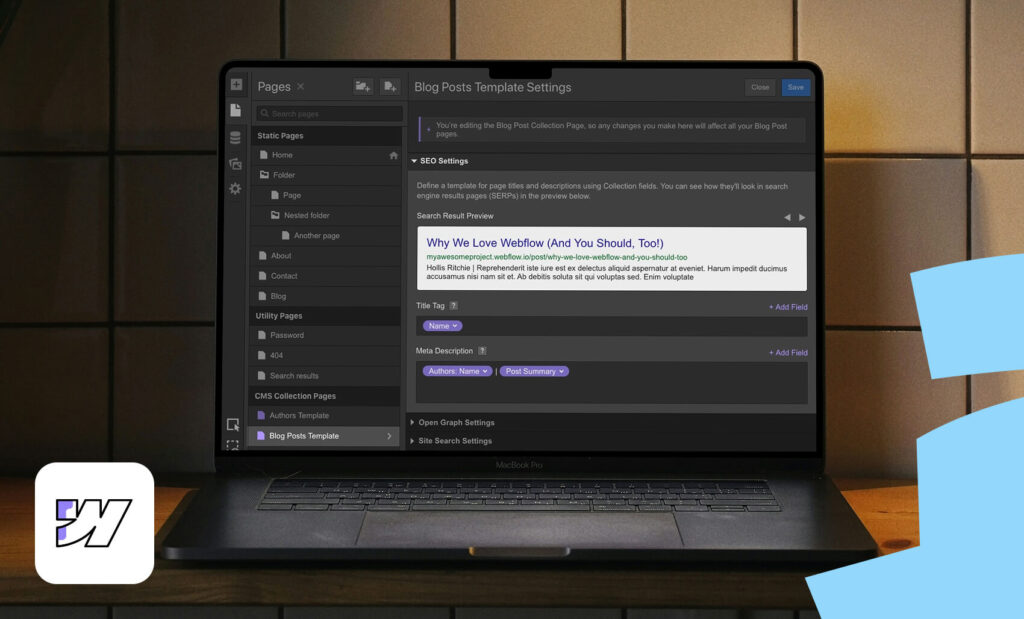
One of Webflow SEO’s fundamental aspects is ensuring that every page on your site has relevant and engaging SEO titles and meta descriptions. They convey your page’s essence to users and search engines.
Well-crafted meta titles and descriptions can help you get more clicks and ultimately rank your pages higher as they bring more value to search engines. To add page titles and meta descriptions, find SEO settings by heading to Page settings.
Here are tips for crafting SEO titles:
- Keep them within 55 characters to ensure they’re fully displayed within the SERPs (Search Engine Results Pages)
- Make them interesting, unique, and aligned with the search intent
- Provide relevant keywords within it
Your meta titles should be similarly engaging and include the following:
- Keep them between 150 characters to ensure they’ll be fully displayed in the Search Engine Results Pages
- Include keywords within and include them from the start
- Make them attractive and unique with a CTA to attract clicks.
4. Optimize page loading speed
Your site should load within seconds to prevent Google from putting you aside. This is one of the most important ranking factors when developing a new Webflow site, as slow websites will get punished and placed lower.
The great thing about Webflow is that it offers excellent predisposition for a fast-loading website such as:
- Lazy load images by default
- Pre-renders the pages that users mostly visit
- Provides a set of fonts for loading faster on your pages
Ultimately, it mostly depends on how you set up your website. Images over 1MB or plenty of bloat code will slow down your site, causing a bad user experience. The elements that usually affect a website’s speed include:
- Images
- Videos
- CSS and Javascript
- HTML code
- Other multimedia files
Ensure you identify these elements and optimize them as much as you can to ensure a lightning-fast website.
FAQs on Webflow SEO best practices
Do I need coding skills to do SEO on Webflow?
No, Webflow is built for “no-code” users. You can optimize page titles, meta descriptions, URLs, alt text, and more without touching any code. Most SEO settings are available through simple toggles and text fields so that beginners can learn quickly. If you ever need more advanced customization, Webflow still lets you add code snippets later.
Does Webflow automatically make my website SEO-friendly?
Webflow provides a strong foundation (clean code, fast hosting, responsive design), but you still need to add high-quality content, optimize pages, and follow SEO best practices. Think of Webflow as giving you the tools; you still have to use them correctly. Your rankings will depend on how well you structure content, target keywords, and maintain fast-loading pages.
What is an XML sitemap and does Webflow create one?
An XML sitemap is a file that lists all the essential pages on your site so search engines can find them. Yes, Webflow creates your sitemap automatically, and you don’t need any plugin or extra setup. Search engines use this file to prioritize which pages to crawl first, which helps new websites get indexed faster.
Do Webflow templates affect SEO?
Yes. Some templates are better optimized than others. Choose a clean, lightweight template and avoid ones filled with unnecessary animations or large media files, as these can slow down your site. Before using a template, preview how it loads and check whether the structure looks well-organized and straightforward. A good template reduces the cleanup you need later for performance and SEO.
Final thoughts – Focus your SEO on users’ needs
Even though implementing SEO best practices is vital, keeping a user-centered website and content is equally crucial. Search engines like Google prioritize websites that offer value to users and rank them higher.
Leveraging Webflow’s robust SEO features and implementing our best practices will guarantee your site’s success in the coming years. Thus, enhance your Webflow site for search engines, create high-quality content, and provide outstanding UX.
Need help improving your SaaS site or product? Get in touch! We can help.

Hey there! I’m Dewa, the Tech Team Lead at SDB Agency, and I’ve been at SDB since the very beginning. I create clean, fully functional websites through WordPress, Webflow, and Shopify, with the help of messy brainstorming sessions and plenty of caffeine. Outside of work, I hit the gym, watch football, and never miss a Real Madrid match.